Shopify App Stack Audit: A Step-by-Step Guide for 2026
/
A Shopify store rarely gets bloated in one dramatic moment. It happens in small, reasonable decisions. One app for upsells. Another for reviews. A quick trial for merchandising. A support tool that solved one urgent problem and then stayed. Six months later, the store feels heavier, the monthly software bill looks vague, and nobody on the team is fully sure which apps are still earning their place.
That’s why a shopify app stack audit matters. Done properly, it isn’t a spring cleaning exercise. It’s a revenue review. The point isn’t to strip the store down to the fewest apps possible. The point is to keep the tools that make money, remove the ones that slow the storefront or duplicate work, and reduce the operational mess that builds up as a brand scales.
The strongest audits look at more than code. They also look at ownership, workflow dependence, vendor relationships, and how new tools enter the stack in the first place.
Table of Contents
Your App Stack Is Leaking Revenue
Build Your Master App Inventory
Start with the admin, not assumptions
Track the fields that support decisions
Analyze Apps with the Four-Pillar Framework
Score performance before debating features
Review overlap, value, and risk together
Gather Human Intelligence with Stakeholder Interviews
Ask what breaks, not what people like
Stakeholder Interview Prompts
Listen for conflict, not consensus
Create Your Remediation Roadmap
Turn Your Stack into a Strategic Advantage
Make audits part of operator discipline
Use the merchant community as an input, not just your internal team
Your App Stack Is Leaking Revenue
A familiar scenario. A store is growing, conversion on mobile starts slipping, and nobody can point to one clear cause. The merchandiser added a bundle tool last quarter. Support installed a help widget during a busy season. An agency left behind a promo bar app after a campaign ended. Finance sees the monthly software bill rising, but the team is nervous about removing anything because each app might be tied to revenue, operations, or theme behavior.
That is how margin leaks from a Shopify store. Not through one bad decision, but through a stack that no longer has clear owners, clear outcomes, or clear limits.
I see this in audits all the time. A merchant will swear they run a lean setup, then we find a review app that was replaced months ago but still injects code into the theme, a shipping rules app still billing after logistics moved to native settings, or two upsell tools competing for the same cart events. One apparel brand I worked with had an old size guide app left over from a theme rebuild. The subscription fee was small, but the bigger issue was the script. It was loading on every product page even though the feature was no longer in use, adding weight to the page and creating one more thing to debug when PDP conversion dropped.
The pattern is accumulation without review.
Trial apps stay installed after the test ends
Different teams solve the same problem with different tools
Temporary campaign fixes become part of the permanent stack
Apps keep billing because nobody owns the offboarding work
A store should be able to explain every app in one sentence. What outcome does it protect or improve? Revenue. Margin. Conversion rate. Average order value. Support efficiency. Merchandising speed. If the answer turns into guesswork, that app belongs in the audit queue.
The business case is straightforward. App audits are not just technical cleanups. They are operating reviews. They force the ecommerce lead, developer, marketer, finance owner, and sometimes the vendor itself to justify what stays in the stack. They also surface a second advantage. Merchants who pay attention to how apps perform, and who follow broader Shopify app research and merchant feedback patterns, make better decisions than teams that treat app installs as one-way doors.
Strong stores still use apps aggressively. They just do it with discipline. The goal is a stack your team understands, your vendors can support cleanly, and your customer experience can carry without friction.
Build Your Master App Inventory
The first job is visibility. A store can’t evaluate what it hasn’t mapped. In Shopify stores scaling past $500K in revenue, it’s common to see stacks with dozens of apps, and a full inventory often surfaces post-trial installs that nobody realized were still contributing to drift and cost, as noted in this Shopify app stack audit reference.
Start with the admin, not assumptions

The inventory should begin in Settings > Apps and sales channels. Every app gets a row in a spreadsheet. That includes active apps, sales channel add-ons, and anything inactive that still needs verification.
A basic list of app names isn’t enough. The inventory needs to become a decision document the team can work from later.
Track the fields that support decisions
At minimum, each row should include:
App name
Use the exact name shown in admin so the team can cross-check billing and permissions.Monthly cost
Record what the store is paying now, not the plan the team thinks it’s on.Primary function
Keep this simple. Email capture, subscriptions, product bundles, returns, search, merchandising, reviews, support.Owner
Name the person or team that depends on it most. Marketing, support, ecommerce, retention, ops, development.Installation type
Note whether it uses theme app extensions, embeds, script-based installation, or works mostly outside the storefront.Storefront impact
List where it appears. Home page, PDP, cart, checkout-adjacent workflows, post-purchase, account area.Status
Active, inactive, under review, or suspected ghost install.
The strongest inventories make app ownership obvious. Once a human owner is attached to each tool, weak apps become much easier to challenge.
A useful extra field is “replacement already exists?” That often exposes the most obvious redundancy. A support team may rely on one feature from an app that another approved platform already covers.
For teams that regularly evaluate tooling, it also helps to keep a separate shortlist of research notes and alternatives. A resource like Shopify app research workflows can help app teams and operators keep discovery organized instead of relying on inbox pitches and scattered screenshots.
Analyze Apps with the Four-Pillar Framework
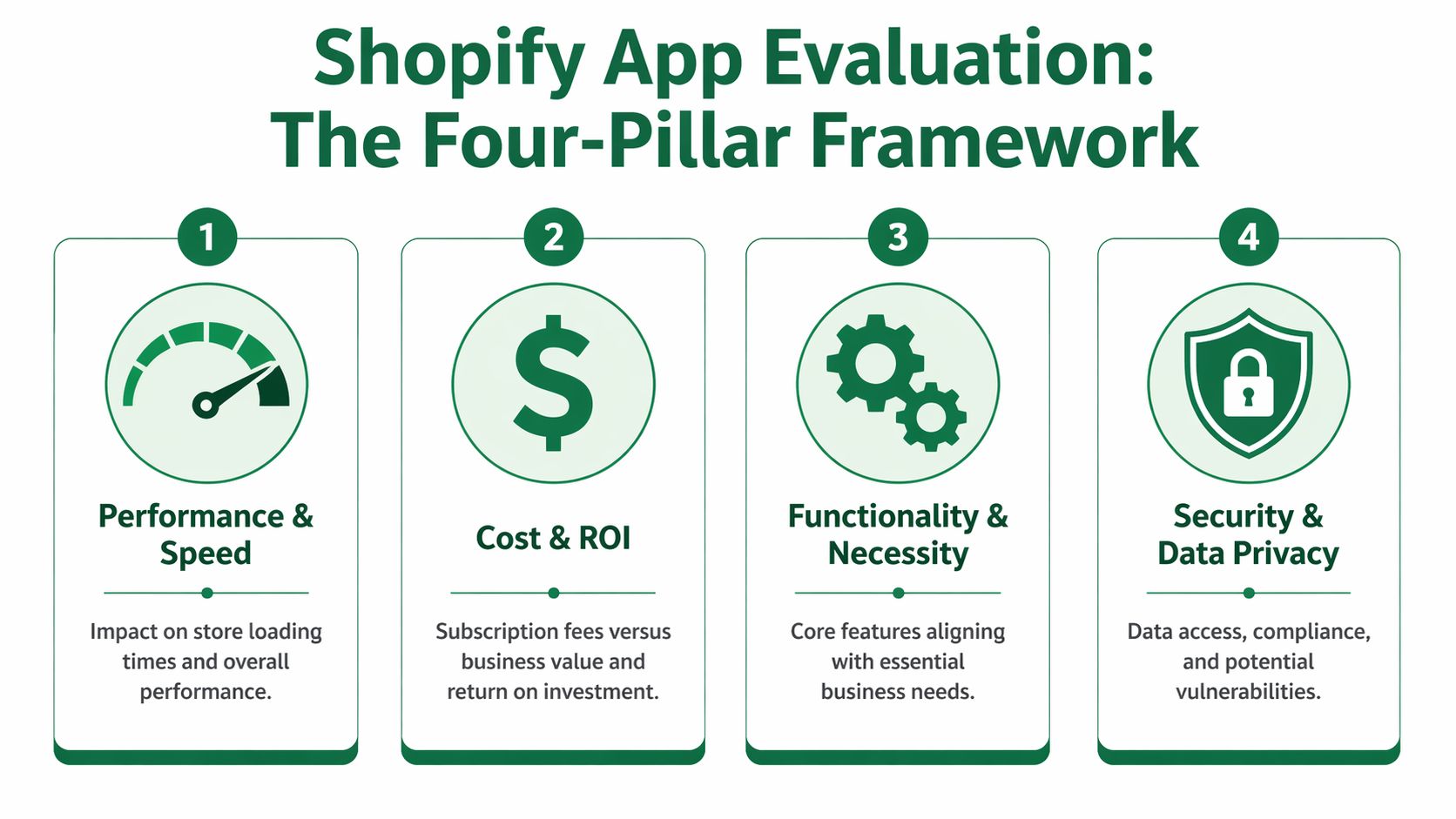
An app audit starts to pay off when each tool has to defend its place in the stack. The practical way to do that is to score every app against four revenue-linked pillars: performance, cost, functionality, and security or operational risk.
That structure keeps the review out of opinion wars. It also gives marketing, ecommerce, support, and development a shared way to judge trade-offs instead of arguing from isolated priorities.
Score performance before debating features
Performance belongs first because it affects every visitor, not just the team that requested the app. An app that adds visual clutter is a nuisance. An app that slows product pages, cart flows, or post-purchase steps can reduce revenue every day it stays installed.
Use a simple 1 to 5 score:
1 means the app creates obvious storefront drag or loads broadly where it should not
3 means impact is mixed, situational, or not yet measured cleanly
5 means impact is low or tightly scoped to the pages where the feature is needed
Run before-and-after checks whenever possible. Turn off app embeds. Remove the app from a duplicate theme. Test specific templates instead of guessing from the homepage alone.
The common mistake is treating speed as a developer concern and value as a business concern. On a Shopify store, they are the same conversation.
This walkthrough gives a useful visual overview of how teams think through app evaluation in practice.
Review overlap, value, and risk together
Once performance is scored, the rest of the audit gets sharper. The goal is not to prove every duplicate feature is bad. The goal is to find which apps still earn their operating cost and which ones survive only because nobody wants to own the removal decision.
Functionality and overlap
Some overlap is deliberate. A retention team may want one tool for messaging and another for onsite merchandising because the workflows, reporting, and ownership are different. That can be justified.
A lot of overlap is accidental. Different teams install tools to solve the same problem from different angles. Later, nobody remembers which app is the system of record.
Look for patterns like:
Two apps collecting similar customer data
Multiple widgets pushing the same conversion action
Separate tools installed by different teams for one workflow
An app left in place after Shopify features or another approved app already replaced most of its job
Low overlap scores should trigger a harder question. If this app disappeared, would revenue drop, would work slow down, or would nobody notice?
Cost and commercial value
Monthly price matters, but it is only one line in the cost equation. The full figure includes page weight, maintenance time, support friction, vendor dependency, and the internal effort required to keep the app configured correctly.
Good apps are allowed to be expensive. They just need to earn it.
Use questions like these:
Does this app tie to a measurable business outcome?
Would the team approve this spend again today?
Is it supporting a core flow, or adding interface noise around it?
Does the current plan match real usage, or is the store paying for headroom it never uses?
This part of the audit often benefits from outside pattern recognition. Teams that want evidence on why merchants replace tools can review competitive research on Shopify app switching behavior instead of relying only on vendor claims or internal assumptions.
Security and operational burden
The final pillar is where resilient stacks are built. An app can drive sales and still create enough maintenance risk to justify replacement, tighter controls, or narrower implementation.
The problems usually show up in three places:
Pillar issue | What it looks like | Why it matters |
|---|---|---|
Permission sprawl | The app accesses more customer, order, or store data than the team expected | Broader access increases review burden and vendor risk |
Workflow friction | Staff rely on manual workarounds, duplicate entry, or exceptions to use it properly | Hidden labor costs eat into the app’s claimed value |
Fragility | Theme updates, promotions, and launches require extra caution because of the app | The store gets harder to change without breaking revenue-critical pages |
This pillar should involve more than technical review. Ecommerce leads, developers, operations, and the vendor all see different forms of risk. Stores with the cleanest stacks usually treat app decisions as shared operating decisions, not one-time installs. That is what turns an audit from cleanup into a stronger long-term system.
Gather Human Intelligence with Stakeholder Interviews
A spreadsheet can show billing, placement, and technical clues. It can’t show silent dependency. That’s where many audits go wrong. A team removes something that looked redundant, then discovers customer support was using one hidden feature every day to resolve issues faster.
Short stakeholder interviews prevent that mistake.
Ask what breaks, not what people like
These conversations don’t need to be long. Fifteen minutes is usually enough if the questions are specific.
The most useful prompt is simple: “If this app disappeared tomorrow, what would stop working first?” That gets people away from generic opinions and into real process dependence.
Other strong prompts include:
What task do you use this app for most often?
Which feature is essential, and which features are rarely touched?
What manual workaround would replace this if needed?
Where does this tool create rework, confusion, or duplicate effort?
Has another app already taken over part of its job?
Teams usually overestimate feature breadth and underestimate workflow dependence. The audit needs both.
Different departments reveal different forms of value. Marketing may care about segmentation or promotion control. Support may care about speed and visibility. Operations may care about sync reliability or exception handling.
Stakeholder Interview Prompts
Team/Role | Key Question | Goal |
|---|---|---|
Marketing | Which campaign or merchandising task would become harder without this app? | Identify revenue-facing dependence |
Customer support | Which daily workflow inside this app saves the most time? | Surface hidden operational value |
Operations | Where does this tool create exceptions, duplicate entries, or manual fixes? | Find burden and process drag |
Ecommerce manager | If this app vanished, what would need to be replaced first? | Prioritize replacement risk |
Developer or agency partner | Does this app make theme changes harder, slower, or riskier? | Expose technical fragility |
Founder or GM | Would this still be approved at today’s price and current store complexity? | Re-test commercial logic |
A useful pattern is to compare interview answers against the inventory sheet. If the spreadsheet says an app is low-value but three teams rely on it in different ways, the app may need replacement rather than removal. If nobody can explain why it exists, the answer is usually clearer.
Listen for conflict, not consensus
Consensus can be misleading. The audit gets sharper when the team notices where views conflict.
For example:
Marketing says a pop-up tool is important.
Support says it creates confusion for returning customers.
Development says it injects too broadly.
Ecommerce says another platform already handles most of it.
That’s not a problem. That’s useful evidence. It usually points toward consolidation or a tighter configuration, not blind retention.
Create Your Remediation Roadmap
A stack audit pays off when each app leaves the review with a decision, an owner, and a deadline. Otherwise the same clutter stays in place, the same scripts keep loading, and the same monthly charges keep hitting the P&L.
Use four decisions only: Keep, Consolidate, Replace, or Cut.

That constraint matters. Teams get stuck when every app turns into a debate about edge cases. Four options force a commercial decision.
Keep
Keep an app when it earns its place. It supports revenue, the team uses it as intended, and the operational cost is acceptable. "Would we approve this again at the current price?" is still the fastest test.
Consolidate
Consolidation removes overlap without breaking the workflow. One tool stays because it covers the job well enough, the team knows how to use it, and removing the others reduces app fees, duplicate logic, and storefront bloat. This is often the highest-return move in a mature stack.
Replace
Replace an app when the job still matters but the current tool creates drag. Common reasons include weak support, poor fit for the team, heavy frontend impact, awkward data handling, or pricing that no longer matches value. A replacement decision should include migration steps, rollback planning, and a clear success metric.
Cut
Cut an app when it no longer justifies any attention. That usually means low usage, redundant functionality, or side effects that outweigh the benefit. Removal is not complete until the team checks embeds, leftover theme code, permissions, tracking changes, and any process the app implicitly supported.
A good roadmap is specific enough that marketing, operations, development, and leadership can all see what changes, who owns it, and what the business gets in return.
One caution. Do not treat replacement as the default answer for every expensive app. In many audits, the better move is to renegotiate first. If the tool still supports an important workflow, ask the vendor for a plan that reflects actual usage, annual pricing, or feature alignment. Stores that communicate clearly often get better terms than stores that churn without communicating.
A simple message works:
“We’re reviewing our current app stack and validating spend against usage and business impact. This app is under review. Do you have a better-fit plan, annual option, or pricing adjustment based on how our team actually uses it?”
That outreach does more than reduce cost. It also tests the vendor relationship. Responsive vendors help during cleanup, migration, and configuration changes. Unresponsive vendors create more risk, which should weigh into the decision.
The roadmap itself should capture five fields for every app:
Decision
Owner
Priority
Dependencies
Review date
I also recommend adding one more column: vendor action needed. That keeps the audit from becoming an internal exercise only. Sometimes the best outcome comes from a pricing change, a feature clarification, a support escalation, or product feedback that helps the app team improve the fit. If you want a useful reference for framing those conversations, this guide on defining a Shopify app's positioning strategy is relevant because strong vendors usually explain who their product is for, what job it does, and where it should not be used.
Sequence matters as much as the decision itself.
Remove low-value clutter first. Consolidate overlapping tools next. Replace core but flawed apps only after the team has protected the workflow, assigned ownership, and agreed on success criteria. That order lowers risk, protects revenue, and gives the store cleaner wins early instead of starting with the most fragile part of the stack.
Turn Your Stack into a Strategic Advantage
A familiar pattern shows up after an audit. The store cuts a few unused apps, saves some monthly spend, and then starts adding tools again under deadline pressure. Six months later, the same problems are back. Conflicting scripts. Duplicate functions. No clear owner. Support tickets bounce between internal teams and vendors while conversion rate pays the price.
That cycle ends when app decisions become part of operating discipline, not a once-a-year cleanup project.
Teams that keep a healthy stack usually do three things well. They review app fit on a schedule, they control how new apps get approved, and they keep vendors close enough to fix issues before those issues affect revenue. The technical cleanup matters, but the bigger advantage comes from building a better decision system around the stack.
Make audits part of operator discipline
A resilient stack is built through repeated review.
Use a simple cadence:
Quarterly stack reviews to confirm each app still has an owner, a business case, and a place in the workflow
Post-launch checks after major campaigns, theme changes, or new app installs
Approval rules that require business justification before any app touches the storefront, checkout, or core operations
Shared documentation so ecommerce, retention, support, and development teams are working from the same app record
That last point gets missed. Stores rarely suffer because one app is bad on its own. Problems show up because marketing installs one tool, operations depends on another, the agency customizes around both, and nobody stops to ask whether the combined stack still makes financial sense.
Good governance also changes the quality of vendor conversations. Instead of asking support basic setup questions after the fact, the team can ask sharper questions before renewal, before expansion, and before another app enters the stack. A useful reference is this guide to defining a Shopify app's positioning strategy, because strong vendors are usually clear about the job their product does, the merchant it fits, and the cases where it should not be used.
Use the merchant community as an input, not just your internal team
Internal audits catch waste. External feedback helps prevent it from returning.
Merchants who run larger or more complex stores benefit from hearing how other operators evaluate apps, pressure-test vendor claims, and report on real workflow friction. That kind of input is useful because app selection is rarely a pure feature comparison. It is a decision about operational fit, support quality, implementation risk, and whether the vendor will still be useful when the store changes.
Paid research participation can help here. It gives merchants a structured way to share hands-on feedback with app teams, explain where tools fail in real store environments, and build direct relationships with the people shaping product roadmaps. That is more useful than passively filtering through cold outreach or marketplace listings.
Benefit | Why it matters |
|---|---|
Get paid for operator insight | Teams can turn real store experience into paid research conversations instead of giving feedback for free in scattered support threads. |
See products earlier | Research discussions often expose upcoming features and product direction before broad promotion starts. |
Influence vendor priorities | Merchants can push for fixes and workflows that reflect real operational needs, not generic feature requests. |
Strengthen vendor relationships | Direct conversations with product teams usually produce better context than reactive support exchanges. |
Improve future app decisions | Better feedback loops reduce the odds of adding another bad-fit app to the stack. |
A disciplined audit process lowers cost today. A stronger network of internal stakeholders, vendors, and merchant feedback improves the next round of decisions too.
AppStoreResearch connects vetted Shopify operators with app teams for paid research conversations. For merchants, agency operators, and ecommerce leads who want to turn stack experience into useful product feedback, app store research gives you a direct line to the teams building the apps you may depend on next.

Author
Jonathan Kennedy
Jonathan Kennedy is the founder of app store research and shopexperts, platforms that connect operators, founders, and experts across the Shopify ecosystem to drive better decisions, product development, and growth.