Opening an Online Boutique: A Shopify Playbook for 2026
/
Most new founders start opening an online boutique in the same place. They have a product idea, a moodboard, a name saved in notes, and a half-built storefront. What they usually don’t have is proof that anyone wants the assortment, confidence in the margins, or a clear idea of which Shopify decisions matter early and which can wait.
That gap is where most boutiques get into trouble. The early work isn’t theme tweaking. It’s deciding what to sell, who it’s for, how it will make money, and what the store needs to run without becoming a pile of apps, fees, and returns.
For Shopify merchants, agencies, and app teams, that journey is useful for another reason. Every step in opening an online boutique reveals a product question. Where do merchants hesitate? What do they overbuy? Which workflows feel risky? Those are the exact moments worth validating with real operators before building features around assumptions.
Table of Contents
Validate Your Niche Before You Build Anything
Start with a narrower promise
Vet suppliers before picking a platform setup
Establish Your Business and Legal Foundation
Set up the entity before the store expenses start
Keep the admin simple and clean
Build Your Shopify Store and Core App Stack
Choose the theme for function first
Build a small stack on purpose
App Developer Sidebar
Design Product Pages That Actually Convert
Make the page answer the buying questions
Use social proof without clutter
App Developer Sidebar
Master Pricing, Payments, and Shipping
Price from costs backward
Build checkout and shipping around trust
Create Your Go-to-Market Launch Plan
Pre-launch momentum
Launch day execution
Post-launch week discipline
Your First 90 Days Operations and Metrics
Watch a short list of signals
Turn feedback into operating changes
Validate Your Niche Before You Build Anything
A boutique usually looks polished right before it fails. The homepage is live, the branding is decent, and the founder is proud of the first collection. The problem is that none of those things prove demand.
The risk is bigger than most first-time merchants assume. Only 10-20% of dropshipping businesses, a common model for opening an online boutique, achieve profitability in their first year, with an overall failure rate of 80-90% for such ecommerce ventures according to industry data summarized here. That doesn’t mean boutiques can’t work. It means broad ideas and rushed launches usually don’t.

Start with a narrower promise
“Women’s fashion” isn’t a niche. It’s a crowded category. A strong boutique starts with a clear customer, a specific use case, and a reason to choose this store over every other option in the feed.
A practical niche test looks like this:
Define the shopper first: Write down who the store serves, what they’re shopping for, and what usually frustrates them.
Tie products to a situation: “Workwear” is still broad. “Low-maintenance workwear for women who travel weekly” is more useful.
Check whether the assortment hangs together: The first collection should feel curated, not random.
Test interest before building the full store: A simple signup page, social polling, and direct conversations can surface whether people respond to the concept or just like the visuals.
Practical rule: If the value proposition can apply to almost everyone, it probably won’t resonate with anyone strongly enough.
Competitor analysis matters here, but not in the lazy way most founders do it. The point isn’t to copy bestsellers. The point is to spot gaps. Maybe every store in the niche looks premium but ships generic basics. Maybe everyone sells trend pieces but no one solves fit, fabric, or repeat styling.
That early work is also where merchant pain becomes a product opportunity. Teams doing product discovery and roadmap validation for Shopify should pay attention to these moments, because merchants often need help validating assortment, positioning, and operational readiness before they ever install more software.
Vet suppliers before picking a platform setup
Founders often obsess over storefront design before they’ve confirmed that the product can be sourced reliably. That order is backwards.
Supplier vetting should cover four things:
Check | What to look for |
|---|---|
Product consistency | Samples that match the quality and finish the brand plans to sell |
Communication | Clear responses, realistic timelines, and someone accountable on the supplier side |
Flexibility | Willingness to support small starting orders, variant questions, or packaging requirements |
Operational fit | A process that won’t create customer service problems later |
A weak supplier creates problems the storefront can’t fix. Late shipments, inconsistent sizing, and poor packaging all show up as refunds, complaints, and lost trust.
A boutique should only move into build mode when three things are true. The niche is specific, the customer response is real, and the supplier can support the promise.
Establish Your Business and Legal Foundation
This part isn’t glamorous, but it saves founders from expensive cleanup later. Once money starts moving through the business, messy admin becomes a real operating problem.
Set up the entity before the store expenses start
A new boutique needs a legal home before inventory purchases, platform subscriptions, and ad spend get mixed into personal accounts. For many merchants, that means choosing between a sole proprietorship and an LLC, then registering the business in the appropriate jurisdiction.
The practical sequence is straightforward:
Choose the business name
Confirm the name is available
Register the business entity
Apply for the required tax identifiers
Open a dedicated business bank account
Each step makes the next one easier. A registered business can open accounts cleanly. Clean accounts make bookkeeping possible. Good bookkeeping makes taxes, cash flow review, and margin analysis less painful.
Separate business finances from day one. Founders who wait usually spend more time untangling statements than running the store.
Keep the admin simple and clean
The goal isn’t to build a complicated back office. The goal is to create enough structure that the business can operate like a business.
A simple setup usually includes:
A dedicated bank account: Every store expense and payout should run through it.
A dedicated card for business spend: This keeps subscriptions, shipping purchases, packaging, and samples visible.
A bookkeeping habit: Even a lightweight monthly review beats catching up after a quarter of neglected transactions.
A tax file: Save formation documents, registration details, and receipts in one place.
Many new merchants delay this work because it feels like bureaucracy. It’s part of brand credibility. Wholesale partners, service providers, and customers all trust a store more when the business looks organized behind the scenes.
A founder opening an online boutique doesn’t need a complicated corporate structure. What’s needed is a legal entity, clean financial separation, and enough order to make decisions from real numbers instead of guesses.
Build Your Shopify Store and Core App Stack
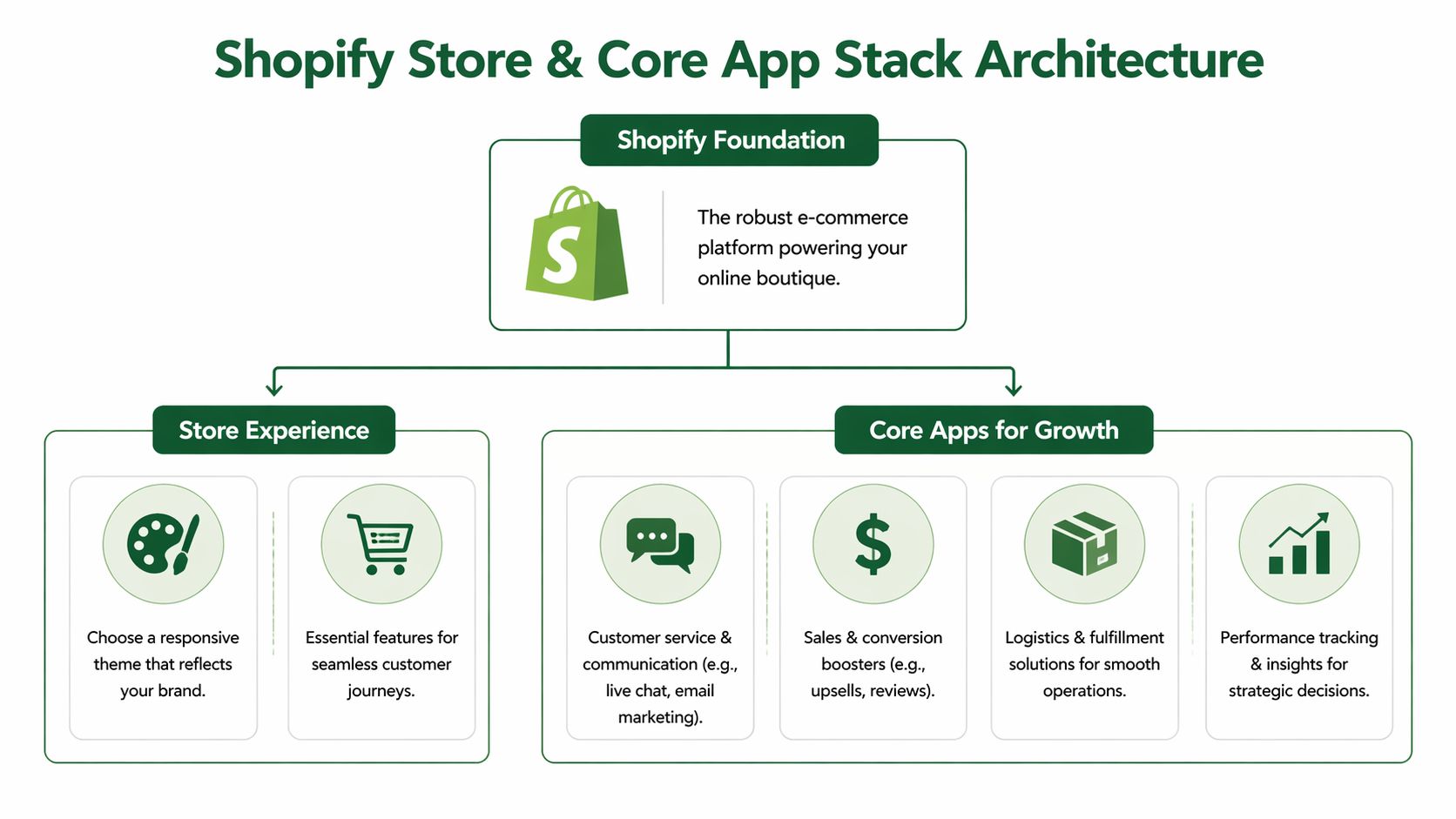
A Shopify store should feel like an operating system, not a collection of disconnected add-ons. New boutiques usually get into trouble when they treat the App Store like a buffet.
That’s getting harder to avoid. Existing guides emphasize basic Shopify setup but overlook the 10,000+ apps, where 70% of new merchants select fewer than 5 initially yet face decision paralysis, resulting in 25% cart abandonment during app trials per recent Shopify data as cited in this overview of boutique setup challenges.
Choose the theme for function first
Boutique founders often choose a theme for aesthetics alone. That’s a mistake. The first theme decision should come down to how the store sells.
A theme needs to support:
Mobile browsing: Most shoppers will discover and browse on phones.
Catalog clarity: Collections, filters, and navigation should be easy to understand.
Visual merchandising: The layout has to support strong imagery without slowing the experience down.
Product page flexibility: The store should be able to communicate fit, materials, shipping, and trust signals clearly.
A visually impressive theme that buries product details or loads too much decorative content usually hurts conversion. A simpler theme with clean product pages and better speed often wins.
Build a small stack on purpose
The first app stack should solve core retail problems. It shouldn’t attempt to automate every edge case before the first real customers arrive.
A practical starting stack usually covers a few categories:
Category | Job to be done |
|---|---|
Reviews and trust | Help shoppers feel confident buying from a new store |
Email capture and retention | Turn first visits into a channel the brand controls |
Customer support | Answer pre-purchase questions before they become abandoned carts |
Analytics and behavior tracking | Show where people drop off and what they interact with |
Shipping and fulfillment support | Reduce manual work once orders begin |
That’s enough to run a serious store. Everything else should earn its place.
App bloat usually starts with good intentions. A founder installs five “helpful” tools, then the theme slows down, the backend gets noisy, and nobody remembers which app controls which widget.
Merchants on larger plans face a sharper version of the same problem. Teams thinking about Shopify Plus readiness and scaling decisions need a stack that’s deliberate, not inherited from a dozen trial installs.
App Developer Sidebar
A new boutique owner doesn’t experience “app discovery” as a category. They experience confusion in a specific moment.
One common research hypothesis looks like this:
Merchants struggle to differentiate between multiple apps that appear to solve the same problem. The app that wins reduces setup anxiety, shows fit quickly, and proves value before the merchant has to rework the storefront.
That matters to app teams. The merchant usually isn’t asking for more features. They’re asking for less uncertainty.
Design Product Pages That Actually Convert
Most boutique traffic doesn’t fail on the homepage. It fails on the product page. If the product detail page doesn’t answer the buying questions fast enough, the shopper leaves to compare options or postpones the purchase.

Make the page answer the buying questions
A strong product page behaves like a competent store associate. It shows the item clearly, explains why it’s worth buying, and removes uncertainty.
The basic structure should do four jobs well:
Show the product accurately: Use clear images, multiple angles, and close-ups that reveal fabric, texture, and shape.
Explain the benefit, not just the feature: “Soft knit fabric” is weaker than “soft knit fabric that layers easily and doesn’t feel bulky under a jacket.”
Handle fit and feel: Sizing guidance, intended silhouette, and practical wear notes reduce hesitation.
Reduce support tickets: Shipping expectations, return terms, and care notes should be easy to find.
A simple product description format works well:
What the item is for
Why it feels better or solves a problem
How it fits or wears
What the customer should know before buying
That structure is easy to scan and stronger than a generic paragraph full of adjectives.
Use social proof without clutter
Reviews matter, but placement matters just as much. A boutique shouldn’t bury all trust signals at the bottom of the page where only determined shoppers will scroll.
Useful trust elements include:
Review summaries near the buy area
Selected customer photos or usage examples
Clear policy snippets
Low-friction answers to common questions
Too many widgets create the opposite effect. The page starts looking defensive or chaotic.
The best product pages don’t shout. They remove doubt.
App Developer Sidebar
Product page pain is one of the clearest research opportunities in Shopify. A merchant doesn’t want “more PDP functionality” in the abstract. They want a page that sells without slowing down or becoming hard to manage.
A useful hypothesis for app teams is this:
Merchants need a simpler way to collect and display richer customer proof on product pages without adding layout clutter or performance risk.
That’s the kind of problem that only becomes obvious when watching real operators manage live merchandising decisions.
Master Pricing, Payments, and Shipping
Many boutiques don’t fail because the product is wrong. They fail because the numbers never worked. A founder sees a healthy-looking retail price, but the margin disappears once fees, packaging, shipping, and returns begin to stack up.
Price from costs backward
A practical formula keeps that from happening. The sustainable pricing formula used by successful boutique operators is (Wholesale cost × 2.2) + shipping = Retail price, and new boutique owners commonly make the fatal error of underpricing by 30-40% according to this pricing guidance for boutique operators.
That formula matters because wholesale cost is only the starting point. The final price has to carry more than the item itself.
Here’s what the retail price is really supporting:
Cost area | Why it matters |
|---|---|
Transaction fees | Every successful order still carries payment costs |
Shipping | Even when customers pay part of it, the store usually absorbs some of the burden |
Packaging and handling | Mailers, inserts, labels, and labor all add up |
Returns and exchanges | Fashion creates post-purchase costs that new founders often ignore |
Marketing | The first order rarely arrives for free |
Operating overhead | Subscriptions, contractors, and basic admin still need to be funded |
A founder opening an online boutique should price for the business they want to run, not for the sale they’re trying to win today.
Build checkout and shipping around trust
Payments and shipping settings are where margin discipline meets customer expectation. The right setup feels simple to the shopper and predictable to the operator.
A clean approach usually includes:
Accepted payment methods that feel familiar: A shopper shouldn’t hesitate at checkout because the store looks limited.
A clear shipping policy: Delivery expectations, processing times, and any thresholds should be visible before checkout.
A returns position that matches the product strategy: Complicated policies create support overhead and damage trust.
A margin check on every shipping offer: “Free” shipping isn’t free to the store.
A shipping offer should be a financial decision first and a marketing message second.
Pricing also creates useful product research questions. For teams working on monetization, bundling, or merchant-facing offers, pricing and packaging decisions for Shopify products should be grounded in how merchants think about margin pressure, not how product teams imagine they do.
Create Your Go-to-Market Launch Plan
A boutique launch works best when it feels like a sequence, not a single event. The stores that stumble usually go live unannounced, post once, and wait for traffic that never really arrives.
The better approach is to build attention before launch, create urgency on launch day, and spend the first week learning fast from real shoppers.

Pre-launch momentum
A strong pre-launch period does three things. It gives people a reason to care, a way to follow, and a reason to come back on launch day.
That usually means:
Posting the concept early: Not polished campaign assets. Real previews of product, fabric, fit, and brand point of view.
Collecting emails before launch: A waitlist or early-access list is more valuable than passive social engagement.
Testing messaging in public: Founders learn quickly which phrases get saved, replied to, or ignored.
Starting direct outreach: Small creators, loyal peers, and aligned communities can drive the first wave of attention.
One effective pattern is to show the same product from multiple angles over several days. First the problem it solves. Then the details. Then how it styles. Then what makes it different from what shoppers already own.
Launch day execution
Launch day should feel coordinated. The store goes live, email goes out, social posts go up, and the founder stays close to inboxes, messages, and site behavior.
A simple launch-day checklist helps:
Confirm the storefront works on mobile
Check every product page and variant
Send the launch email to the early list
Publish social posts with direct product links
Answer questions quickly
Watch where shoppers hesitate
This is not the day to improvise policies or rewrite descriptions in a panic. That work should already be done.
Early customers are rarely buying a perfect store. They’re buying clarity, responsiveness, and enough trust to place the first order.
Post-launch week discipline
The first week after launch is when a boutique starts behaving like a business instead of a project.
Three habits matter most:
Follow up with early buyers: Ask what was easy, what felt unclear, and what almost stopped the purchase.
Reuse buyer questions as site improvements: If three shoppers ask the same thing, the store should answer it before the fourth asks.
Merchandise based on response, not preference: The founder’s favorite item and the market’s favorite item are often different.
A launch week also generates product insight. Merchants reveal where they struggle with offers, merchandising, messaging, and post-purchase operations. Those signals are valuable not only to founders but to agency teams and product teams trying to build better Shopify workflows.
Your First 90 Days Operations and Metrics
The first ninety days determine whether the boutique becomes a repeatable operation or an expensive experiment. Founders who survive this stretch usually focus on a short list of signals and react quickly.
Watch a short list of signals
A new boutique doesn’t need a sprawling dashboard. It needs a few numbers tied to action.
Conversion rate: If traffic arrives but orders don’t, the issue is often product pages, trust, offer clarity, or checkout friction.
Average order value: If customers buy, but baskets stay small, merchandising and bundling may need work.
Customer feedback and return patterns: These reveal fit issues, expectation gaps, shipping confusion, or product quality problems.
Each metric should trigger a decision. Low conversion means reviewing high-intent pages and buyer objections. Low order value suggests testing product pairing, collection logic, or cart messaging. Repeated returns point back to photography, sizing copy, or product selection.
Turn feedback into operating changes
Early operations should create a loop. Customer question, store change. Return reason, merchandising change. Checkout hesitation, policy change.
A boutique gets stronger when the founder treats every support interaction as product data. That’s especially true in the first stretch, when small improvements can change the economics of the whole business.
These same operating insights are valuable beyond the store itself. They help app teams, agencies, and product builders understand what merchants struggle with once the launch excitement fades.
Shopify merchants, Shopify Plus operators, agencies, and app builders who want to share those real-world lessons can join app store research, a platform that connects Shopify merchants with paid product research interviews with app developers and UX teams. It’s a practical way to get paid for feedback while helping teams build better tools around the problems merchants face.
Built with the Outrank tool

Author
Jonathan Kennedy
Jonathan Kennedy is the founder of app store research and shopexperts, platforms that connect operators, founders, and experts across the Shopify ecosystem to drive better decisions, product development, and growth.